
Showing posts with label tech. Show all posts
Showing posts with label tech. Show all posts
Sunday, June 28, 2009

Monday, December 22, 2008
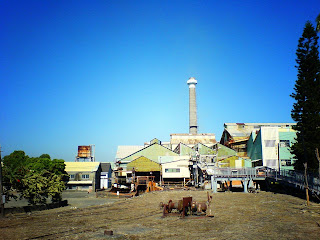
橋頭糖廠 + 超華麗的Linux
Yesterday morning, Tina and I took a stroll at the defunct Ciaotou Sugar Refinery, now a tourist attraction and apparently a favorite shooting location for amateur photographers. Who, us? Haha, nah, we're not even amateur photographers. We're amateur photo-takers -- cell phone photo-takers, no less. :D

In the afternoon, we went to the so-called Computer Street to look for a desktop PC for Tina, but we didn't see anything she liked. In the end, we moved the Linux box originally hooked up to the TV to her desk, so now she has a new toy to play with. :D


In the afternoon, we went to the so-called Computer Street to look for a desktop PC for Tina, but we didn't see anything she liked. In the end, we moved the Linux box originally hooked up to the TV to her desk, so now she has a new toy to play with. :D


Saturday, October 25, 2008
Microsoft Surface, Part Deux
去年七月寫過這篇(有影片噢)告訴大家有Microsoft Surface這種東東正在研發中。前兩天微軟終於宣佈了整組開發套件要多少錢:打九折之後US$13,500。本來微軟希望把價格壓在US$5,000-10,000。看來想在家中客廳擺一個當作咖啡桌,恐怕還得再等好幾年。
Tuesday, September 9, 2008
Google Lively (Beta) 測試中
Google推出了可以內嵌在一般網頁裡的虛擬實境聊天室。
我當然得來玩玩看。:)
第一次使用需要先下載plugin,並做一些人物設定。
裡面的電視物件真的可以播放影片噢!
我當然得來玩玩看。:)
第一次使用需要先下載plugin,並做一些人物設定。
裡面的電視物件真的可以播放影片噢!
Monday, May 19, 2008

Friday, August 17, 2007
Google Analytics
應讀者要求,我本來想說好啊,就寫一篇怎麼使用Google Analytics的教學文章吧,可是後來研究了一下別人寫過的東西才發現,我還真不知道要怎麼下筆耶。因為其實最需要解說的部分只是設定過程(真正使用上不難,而且分析的重點因人而異),但是這設定又牽涉到改寫部落格的版面樣式,而我只知道怎麼改Blogger的,對其他的部落格則完全不懂。不過還好有許多熱心的網友已經撰文解說了該如何設定各種部落格,像是如何在Xuite加入Google Analytics的追蹤程式碼。另外,看來無名小站的免費會員無法使用Google Analytics噢,只有金卡會員才可以,這是無名的設定說明。如果需要其他部落格(像是Pixnet和樂多)的設定方法,這裡也有。
以上是運用現有網路資源的借力使力教學指引法,沒能寫出一篇original的Google Analytics教學,慚愧慚愧!^^|||
以上是運用現有網路資源的借力使力教學指引法,沒能寫出一篇original的Google Analytics教學,慚愧慚愧!^^|||
Saturday, July 7, 2007
Manipulating Information With Microsoft Surface
This looks to be rather similar to the Microsoft DigiDesk I blogged about two months ago, but it appears to be a more mature concept that could be in casinos and a few other places by the end of 2007. Perhaps one day, your coffee table, kitchen countertop, and even wallpapers could employ such multi-touch technology. Personally, though, I think that would be a bit of an overkill.
Wednesday, May 16, 2007
Theremin -- 「骨灰級」電子樂器

photo: Wikipedia
這是發明竊聽器和自動門感應器的Leon Theremin對電子音樂的貢獻。它就叫做「theremin」,發明於1919年,中文譯名不一,有「特雷門琴」、「空間感應電子樂器」、「色麗明」、「仙籟鳴」等。
這個樂器呢,一邊是個直豎的天線,另一邊是個環狀的天線,而表演者則透過揮動雙手來改變頻率和音量。早期,theremin曾被拿來為恐怖片和科幻片做配樂(看過下面的video #3就知道為什麼了),後來被許多前衛的樂團用來嘗試電子音樂。
按下「更多」之後,可以欣賞一些theremin演奏,不過別對最後那個影片抱有太大的期望噢(其實我是在YouTube看到這位老兄的表演才開始在網路上找相關資訊的)。:)
更多 >>
Tuesday, May 15, 2007
發光二極體燈泡將逐漸取代白熾燈?


Thursday, May 10, 2007
Peter Piper Prints A Pack of Plastic, Uh, Pacifiers?

Alvin Toffler the trendspotting master may be proven right once again. Rapid prototyping, 3D printing, digital fabrication, desktop manufacturing -- call it what you will -- is becoming more and more affordable, opening up all kinds of possibilities for prosumers, even those who are not savvy enough to build their own Fab@Home or RepRap. Here's the latest: According to Engadget, Desktop Factory is planning to sell 200 3D printers sometime this year (2007) for US$4,995 each in an initial test run, with the goal of eventually dropping the price to US$1,000 in four years.
If this technology ever becomes as ubiquitous as the 2D printer, there is the very real possibility that it is only going to generate more products that are not truly needed, only desired. On the other hand, a digital fabricator like MIT's Fab Lab that is aimed at helping people in the third world build tools for work and survival seems to me to be a much more useful endeavor. (Plus it's more versatile because it even builds electronics!)
via Engadget
Saturday, May 5, 2007
Visualizing Information With Microsoft DigiDesk

This is still in the proof of concept stage, so don't expect to see it on sale anytime soon. What you get when Microsoft starts thinking about the workstation of the future is this: A keyboard-less, mouse-less, touch-driven, speech-recognizing, document-digitizing, bland-graphics-animating, ultra-wide-touchscreen-and-heads-up-display-touting computer station for someone in the slave driver's seat, running production process management software. In other words, this is MS Project on steroids.
In all fairness, though, how it handles document digitization and manipulation looks impressive and intuitive enough.
After expanding the post: YouTube video of a DigiDesk presentation by the folks at Redmond.
show more >>
Friday, May 4, 2007
Movie QR Code (and Japanese Schoolgirls)
This cheesy video is about two Japanese schoolgirls kung fu fighting over whether the anime/manga character Black Jack is Japanese or not. But ultimately, it's really about a new type of QR code that incorporates video.
Expand the post to read a rough English translation provided by some kind soul on YouTube.
show more >>
Expand the post to read a rough English translation provided by some kind soul on YouTube.
show more >>
<< show less
Um, do you know of Black Jack?
Yeah, I know him, I know him.
Isn't he cool?
Yeah he is cool.
Isn't he a foreigner?
No, I think he's Japanese.
Eh, he's a foreigner.
Huh! He's Japanese!
He's a foreigner!
I said he's Japanese!
FOREIGNER!
JAPANESE!
Foreigner! Japanese!
He's a foreigner. Isn't his name Jack!
What are you talking about! His real name is Japanese and his old man too!
Even though that's true...!
Uh, Mori? Are you ok?
JAPANESE!
FOR-EING-ER!
WAIT A MINUTE! WAIT A MINUTE!
SCAN ME, SCAN ME!
YOU'LL FIND THE ANSWER!
HURRY! SCAN ME! HURRY!
via TOKYOMANGO
Friday, April 27, 2007
Visualizing Statistics Through Gapminder
Some people are trained or born with the ability to visualize statistical relationships inside their heads. For those who are not so lucky, this tool looks to be a big help. Gapminder is a Swedish foundation that began with an idea to enhance our understanding of world health. In the process, it developed visualization software like the Trendalyzer, which was recently acquired by Google. Go ahead, try it out, or watch this video below to see the Trendalyzer and other Gapminder software like Dollar Street in action.
Update: TED talk by Gapminder co-founder Hans Rosling
Related blog entries: Understanding Statistics Through Games, Visualizing Information With Microsoft DigiDesk, The Next 4 Billion?
Update: TED talk by Gapminder co-founder Hans Rosling
Related blog entries: Understanding Statistics Through Games, Visualizing Information With Microsoft DigiDesk, The Next 4 Billion?
Subscribe to:
Posts (Atom)